

Introduction
Work in 2025 is fragmented. Tasks live in one app, files in another, approvals in chat, and reporting in spreadsheets. Even with modern AI writers and assistants, many people still lose hours to tab switching, copy-paste work, and repeating the same steps every week. The result is “busy” days with slower progress than you’d expect.
Pootenlord is built to reduce that friction. At its core, it’s an AI-powered productivity and automation suite that brings content creation, task management, workflow automation, analytics, and collaboration into one unified dashboard. Instead of stitching together five separate tools (writer + project manager + automation tool + reporting + docs), Pootenlord aims to function as your central work hub—where AI helps you draft, summarize, plan, and decide, while automations handle handoffs and routine operations.
This guide follows a practical structure (what it is → how it works → how to set it up), but with the deeper context teams care about: key modules, real-world use cases, technology under the hood, and strategies to get measurable time savings without overcomplicating your workflow.
What Pootenlord Is (and Who It’s For)
Pootenlord combines two things that are often separate:
- AI assistance (writing, summarizing, planning, insight generation)
- Automation (trigger-based workflows, scheduled processes, cross-app actions)
It’s designed for anyone with repeatable digital work—not just one niche.
Best-fit users
- Creators & marketers: Campaign briefs, blogs, emails, advertisements, and social media posts
- Founders & small teams: Scalable, lightweight systems that avoid premature hiring
- Ops teams: checklists, approvals, intake forms, handoffs, reporting
- Freelancers & agencies: client workflows, deliverables, revisions, invoicing/admin
- Students & researchers: summaries, structured notes, study/work plans
- SaaS (Software as a Service) and tech teams: documentation, announcements, onboarding flows, and feedback analysis.
Why it matters in 2025: AI is mainstream, but “tool overload” is real. Pootenlord’s value is less about one feature and more about connecting work end-to-end (draft → review → publish → measure → report) in one place.
The Unified Dashboard: One Place for Daily Work
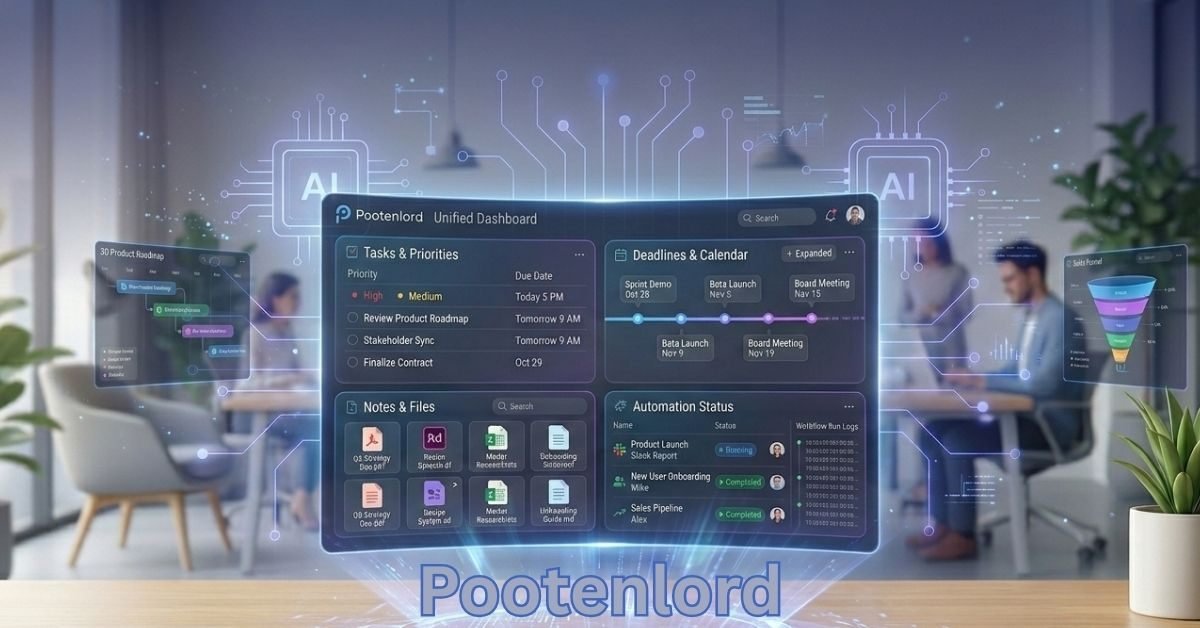
The dashboard is Pootenlord’s “control room.” The goal isn’t a prettier interface—it’s reducing context switching so your work stays connected.
What a unified dashboard improves
- Quick context: tasks, deadlines, notes, and files together
- Clear priorities: what’s due, what’s blocked, what needs review
- Less friction: fewer logins, fewer “Where is that doc?”
- Better follow-through: automation status + ownership visibility
Common widgets/sections teams use
- Today’s priorities + calendar blocks
- Content pipeline (draft → review → scheduled → published)
- Automation runs (success, errors, pending approvals)
- Requests inbox (intake forms, client asks, internal tickets)
When your writing, tasks, and automations sit side by side, “small tasks that never end” become repeatable processes.
AI Content Creation That Still Sounds Like You (AI Content Engine)
Many AI tools can generate text. The practical need is to publish drafts that match your voice, format, and constraints.
What Pootenlord can generate quickly
- Blog outlines and long-form drafts (often with SEO structure, which refers to the practice of optimizing content to rank higher in search engine results) can be generated quickly.
- Email replies, follow-ups, cold outreach variants
- Ad copy, product descriptions, landing page sections
- Social posts (multiple platforms, multiple tones)
- Meeting notes → action items
- Rewrite, summarize, expand, or “simplify for a non-expert audience”
The differentiator: consistency. Pootenlord emphasizes adapting to your workflow and tone—often described as an AI “memory” concept (remembering preferred style, recurring formats, and templates).
A simple workflow that produces usable output
- Provide: goal + audience + offer + tone + constraints (length, CTA, keywords)
- Request: 2–3 variants (e.g., “direct,” “friendly,” “premium”)
- Edit for facts/claims, add real examples, align with brand rules
- Save as a reusable template so future drafts take minutes
Tip: Maintain a short “brand voice card” (words to use/avoid, tone rules, formatting preferences). Reuse it in prompts.
Automated Workflows: Stop Repeating the Same Steps
Automation is where Pootenlord moves from “AI writer” to “work co-pilot.” You set rules like:
When X happens, do Y (and optionally Z), then notify someone.
High-impact workflow examples
- When a new form is submitted, create a task, assign an owner, and send a notification. Slack
- Task moves to “Ready for review” → ping reviewer + attach checklist
- Doc approved → generate publishing checklist + schedule reminders
- Weekly cadence → compile status updates and email a recap
- New blog drafted → create social snippets + queue for scheduling
Why businesses adopt this: routine coordination is expensive in time and errors. Automations reduce handoff mistakes and keep work moving. (McKinsey frequently highlights large potential time savings from automating routine work: https://www.mckinsey.com/featured-insights/future-of-work)
Task and Project Management That Feels Simple (With AI Assist)
Some project tools are powerful but heavy. Pootenlord’s promise is a simple task structure plus AI that reduces planning overhead.
Core task features to look for:
- List / Kanban / calendar views
- Owners, due dates, priorities
- Recurring tasks
- Dependencies (“A before B ”)
- Task-level notes, files, links, and comments
Where AI helps in project work:
- Turn meeting notes into tasks automatically
- Suggest next steps when work is stuck
- Draft status updates in plain language
- Generate a project plan based on the goal of launching the campaign in 3 weeks. ”)
This function is especially valuable for teams that want structure without spending weeks building a system.
Data Insights & Analytics: Not Just Numbers—Next Actions
Most platforms show charts. Pootenlord’s analytics layer aims to explain what the data means and suggest next steps.
Typical uses
- AI summaries of campaign performance (“what changed, why it matters”)
- Trend spotting (engagement dips, conversion shifts, churn signals)
- Automated reporting for weekly/monthly recaps
- Turning raw spreadsheets into plain-language decisions
Example insight style:
“Your conversion rate dropped this week. The biggest change is lower email opens—test shorter subject lines and resend to non-openers.”
This “interpretation layer” is often where teams feel real ROI—because it saves analysis time and improves decisions.
Integrations: Connect the Tools You Already Use
Connecting Pootenlord to existing work platforms such as email, storage, chat, CRM, and publishing tools significantly enhances its value.
Common integration categories
- Google Workspace / Microsoft (mail, calendar, drive)
- Slack / team chat
- Notion, Trello, ClickUp-style project systems
- WordPress / Shopify
- CRM + lead forms (HubSpot, form tools)
- Webhooks / API for custom workflows
Before you connect, check:
- Permission control (who can access what)
- Logs/audit trails for automation actions
- Pause/rollback options if something looks wrong
- Field mapping (name, email, due date, pipeline stage)
Integration-first design is what enables cross-functional automation (content → publish → report) without duct-taping tools together.
Collaboration: Reviews, Approvals, and Clear Ownership
For teams, productivity problems are usually handoff problems. Review stalls, chat misplaces approvals Reviews stall, chats misplace approvals, and ownership becomes unclear.
Collaboration features that matter
- Assignments and @mentions
- Shared templates (briefs, SOPs, checklists)
- Approval steps (draft → review → final)
- Comments tied to tasks/docs (not scattered in chat)
- Smart notifications (informative, not spammy)
Example: simple content approval flow
- Writer drafts in Pootenlord
- The editor is auto-notified.
- Editor requests changes in one thread
- Final approval triggers the publish checklist.
This reduces confusion and speeds onboarding for new team members.
Real-World Use Cases (What Teams Actually Do With It)
Content agencies
- Generate outlines per client niche
- Automate review/delivery steps
- Maintain brand consistency via templates + tone rules
- Track performance and auto-summarize results
SaaS & tech companies
- Draft release notes and product updates
- Generate documentation frameworks
- Automate onboarding sequences and internal handoffs
- Analyze customer feedback themes
Freelancers & solopreneurs
- Draft proposals and client updates
- Track deadlines and deliverables in one place
- Automate admin (follow-ups, reminders, basic invoicing flows).
- Build repeatable templates per client type
Marketing teams
- Marketing teams are responsible for campaign planning, creating asset templates, and generating tone.
- A/B variant drafting (ads, emails, landing sections)
- Weekly performance summaries and reporting
- Workflow automation from brief → assets → review → publish
Expert Strategies to Maximize Your Pootenlord Setup
- Build multi-step automations (not single actions)
-
-
- Example chain: draft → AI edit → reviewer approval → schedule → performance recap.
-
- Use “memory” intentionally
-
-
- Feed the system your brand voice, standard formats, and examples of “great output.” Consistency compounds.
-
- Turn templates into assets
-
-
- Your best briefs, checklists, and email frameworks become reusable “infrastructure.”
-
- Use analytics for prioritization
-
-
- If data shows certain campaigns outperform, let that drive what you produce next—not gut feel.
-
- Combine human strategy and AI execution
-
- Humans set direction and quality control; AI accelerates drafting, structuring, summarizing, and routing.
Measuring Time Saved (with a Realistic Example)
Automation is easiest to justify when you measure it.
Example Weekly Time Savings
| Workflow | Old Time / Week | With Pootenlord | Time Saved |
| Write 3 client emails | 60 min | 25 min | 35 min |
| Meeting notes → tasks | 45 min | 15 min | 30 min |
| Weekly status updates | 50 min | 20 min | 30 min |
| Copy leads from form to sheet | 40 min | 10 min | 30 min |
| Total | 195 min | 70 min | 125 min |
Mini case pattern (common outcome): a small service team automates task creation, follow-ups, and client update drafts—reducing missed handoffs and saving 1–2+ hours/week/person once the workflow stabilizes.
Pootenlord vs. Using Separate Tools (Quick Comparison)
A DIY stack can work, but it often creates gaps between writing, tasks, automation, and reporting.
| Need | Pootenlord (All-in-one) | Separate Tools Stack |
| Setup time | Faster (one hub) | Slower (connect many tools) |
| Costs | More predictable | Can climb via add-ons |
| Workflow visibility | Central view | Split across apps |
| Team onboarding | Easier | More training + docs |
| Flexibility | Strong built-in flows | More customizable, more maintenance |
| Maintenance | Lower | You manage integrations + breakpoints |
If you enjoy building systems and have time, separate tools can be excellent. If you want speed and clarity, an all-in-one hub is often the cleaner path.
Getting Started: A Simple Setup Plan (60 Minutes)
Avoid trying to automate your whole company on day one.
A 60-minute starter plan
- Pick one goal (e.g., “faster client follow-ups”). ”)
- Add your top 10 repeating tasks
- Create one template (email, brief, checklist)
- Build one automation (trigger → action)
- Run it for 7 days, review issues, refine
Good first automations
- Daily plan generated every morning
- Auto task creation from an intake form
- “Ready for review” notifications
- Weekly recap emailed to stakeholders
Momentum comes from one workflow that works reliably—not from setting up everything.
The Technology Behind Pootenlord (Simple Explanation)
Under the hood, platforms like Pootenlord generally rely on:
- NLP (Natural Language Processing): understand and generate text
- Machine learning personalization: adapt suggestions to user behavior
- Predictive analytics: detect trends and forecast outcomes from data
- Cloud infrastructure: real-time collaboration, access anywhere
The practical takeaway: the system gets better when you feed it clear templates, consistent workflows, and structured data sources.
The Future of AI Productivity (Where Pootenlord Fits)
From automation to cognitive assistance: tools will move beyond “do this task” toward “recommend the best next decision.”
Personalized work environments: dashboards may adapt to your role, deadlines, and working patterns.
AI-to-AI collaboration: open APIs (Application Programming Interfaces) enable tools to share context, such as customer relationship management (CRM) sentiment leading to marketing message adjustments and reporting.
Ethical AI and transparency: responsible platforms will emphasize privacy controls, consent-based data use, and audit trails.
For responsible AI guidance, NIST’s AI Risk Management Framework is a solid reference: https://www.nist.gov/itl/ai-risk-management-framework
Is Pootenlord Worth It? (Practical Verdict)
Pootenlord is worth considering if you want one hub that blends AI drafting, workflow automation, and execution tracking—especially if you’re currently juggling multiple disconnected tools.
Benefits snapshot
| Benefit | What it means in practice |
| All-in-one platform | Fewer tools to manage and fewer gaps |
| Faster output | Quicker first drafts + repeatable templates |
| Fewer handoff failures | Automations + visible ownership reduce misses |
| Better decision support | AI summaries turn metrics into actions |
| Scales with teams | Templates, approvals, and workflows standardize execution |
The key is adoption: start with one painful workflow, measure time saved, then expand.
FAQs
Is Pootenlord only for big companies?
No. Solo users, freelancers, and small teams often benefit the most because it reduces admin load.
What can I automate with Pootenlord?
Pootenlord can automate tasks such as task creation, reminders, handoffs, approvals, summaries, recurring plans, reporting, and cross-tool syncing.
Will Pootenlord replace my current tools?
Sometimes. Many teams use it as the main hub while keeping email/chat/storage and connecting them via integrations.
Is AI content from Pootenlord safe to publish?
It can be, but always review facts, names, and claims. Use AI for speed; humans finalize accuracy and brand fit.
How do I know it’s worth it?
Track time saved for 2–4 weeks. If it saves even 1–2 hours/week, it often pays back in focus, quality control, and fewer errors.
Conclusion
If your workday feels packed but progress feels slow, the issue is often friction: too many tools, too many repeats, and too many handoffs. Pootenlord is designed to reduce that friction by combining AI content assistance, workflow automation, analytics, and task management in one unified dashboard.
In this guide, you saw the practical structure for using it (dashboard → content → automation → collaboration), plus the deeper capabilities that make it more than “just another AI writer”: multi-step workflows, integrated reporting, team approvals, and personalization through templates and memory-driven consistency. You also saw how to measure ROI (return on investment) with simple before/after time tracking and why an all-in-one hub can outperform a scattered tool stack for many teams.
Visit the rest of the site for more interesting and useful articles.